
When a customer opens an order, Allmoxy sends them to the default Invoice page. If that page is internal, or the customer lacks a permission, they see an error instead of their invoice. Work through these checks in order.
Applies to: anyone handling a customer who cannot see an invoice, quote or part list.
In this article
- "You do not have access to this cut list"
- A customer cannot see a page at all
- A customer cannot see a part on a page
"You do not have access to this cut list"
The default page for the Invoice type is one your customers are not allowed to see, such as a labels page or an internal part list.
- Go to Settings (gear) > E-commerce > Output Pages.
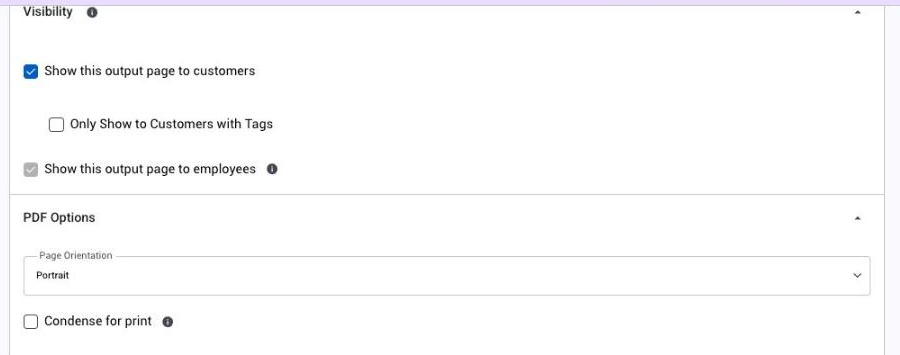
- Open your customer-facing Invoice page and tick This is the default output page for the type chosen above and Show this output page to customers.
- Save. Customers regain the invoice and every other page that is visible to them.
A customer cannot see a page at all
- Show this output page to customers must be ticked on the page.
- If Only Show to Customers with Tags is on, the customer's company needs one of those tags.
- The customer's role needs View Invoice for Invoice pages and View Cutlist for Part List pages.
- The order must be past Bid, unless Allow Output Pages in Bid Status is on in Order Settings.
- Labels pages are never shown to customers.
A customer cannot see a part on a page
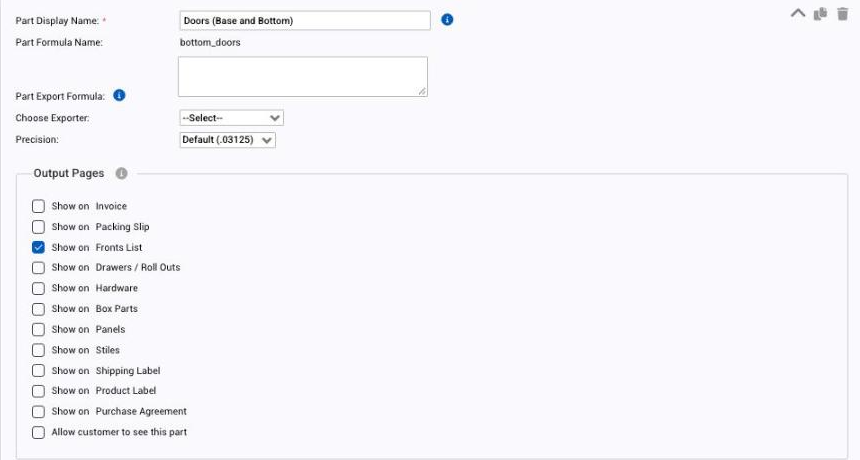
Each part decides whether customers may see it. Open the product (Settings > E-commerce > Products), go to the Parts tab, open the part and tick Allow customer to see this part. The part also needs Show on ticked for that page.