
The Custom Cabinet template is the starter catalog Allmoxy installs for shops that build cabinets to size. Every cabinet product (Base: 1 Drawer, Wall: 2 Shelves, Tall: Oven and so on) shares one set of attributes: a handful the customer answers on the order page, and a larger set that are hidden and hold the defaults your formulas run on. This page lists them all, with the option columns each one carries, so you know what to change when you tune the template to your shop.
Applies to: shops set up on the Custom Cabinet template (project and custom shops). Editing attributes needs the Manage Catalog permission. For how attributes work in general, see How attributes work.
In this article
- How the template is put together
- Order-level settings (answered once per order)
- Other group attributes
- Item attributes (answered per cabinet)
- Things to know
How the template is put together
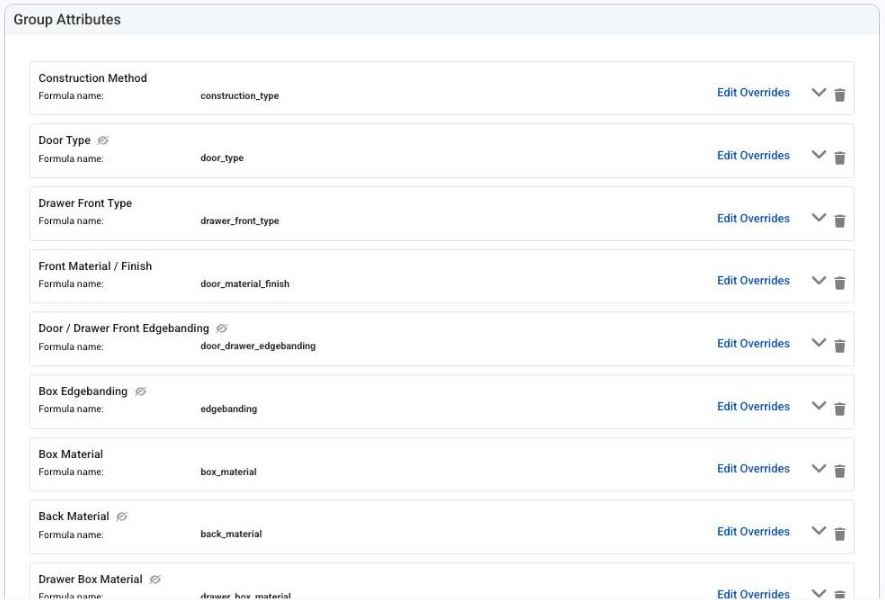
- Group attributes are answered once per line and apply to every cabinet on it: construction method, door and drawer front types, materials, edgebanding, reveals, hardware. Six of them are order-level settings, so the customer answers them once at the top of the order and every line inherits the answer.
- Item attributes are answered per cabinet: width, height, depth, hinge drilling, integrated ends, an optional ID and label, and accessories.
- Hidden attributes (Order Page Visibility set to Hide) never show to the customer. They carry a default option whose columns feed the formulas: material costs, waste yields, margins, clearances. To let customers choose, set the attribute (or its override on one product) to Show.
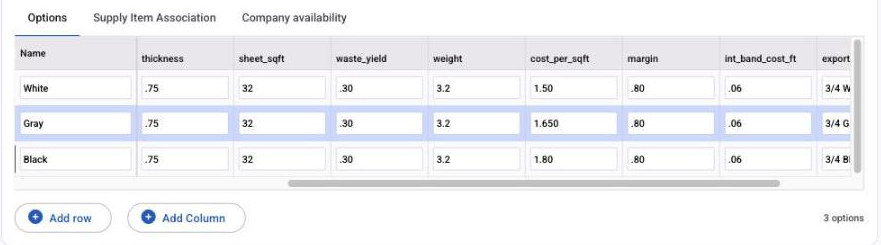
- Option columns are where the numbers live. The parts and pricing formulas read them as
attribute.column, for examplebox_material.cost_per_sqft. Change a column value and every product using that attribute changes. - Each cabinet product carries the same parts (ends, top, deck, stretchers, nailers, toe, shelves, back, doors, drawer fronts, drawer boxes, glides, hinges) plus exporter parts for Envision, Microvellum, Cut Rite, Cabinet Vision and Mozaik, and the same one-line pricing formula built from proxy variables; see Custom Cabinet template: how pricing is built.
Order-level settings (answered once per order)
| Attribute | Formula name | What it asks | Columns the formulas read |
|---|---|---|---|
| Construction Method | construction_type |
Face Frame, Frameless, Face Frame Inset or Frameless Inset | pricing_id (which pricing method the box uses), lineal_ft_price, per_box_price, back_type, back_inset, adj_shelf_gap, dado_add, ro_spacer, fr_stretcher, bk_stretcher, nailer, band_instr, leg_levelers, front_toe, sleeper_add, clip_back_width, back_dado, Per_Leg_Price, catalog, export |
| Door Type | door_type |
Door style, grouped under Decorative Surfaces (Slab, 3 Piece, 5 Piece), Wood Raised Panel (Standard, Scoop) and Wood Flat Panel (Shaker, Mission) | id, outsource, pricing_id, sqft_price, base_price, sqft_overage, material_validator, s_r_width, add_hinge, panel, stilerail, edge, catalog, export |
| Drawer Front Type | drawer_front_type |
Drawer front style, same groups as Door Type. Hidden by default; the default follows the door type | same columns as Door Type |
| Front Material / Finish | door_material_finish |
Decorative Surfaces (White, Gray, Black) or Wood Doors (Alder or Maple, stain or glaze). Linked to supplies | id, pricing_id, sqft_price, sqft_cost, margin, waste_yield, material_validator, sheet_sqft, thickness, weight, material, export |
| Box Material | box_material |
White, Gray or Black melamine. Linked to supplies | thickness, sheet_sqft, waste_yield, weight, cost_per_sqft, margin, int_band_cost_ft, export |
| Drawer & Roll Out Type | drawer_box_type |
None, Dovetail Baltic Birch, Dovetail Maple, Melamine or Metal Drawer. Hidden by default | pricing_id, outsource_id, price_per_box, cost_linear_ft, margin, glide_pricing_id, glide_price, glide_type, clearances, height_1 to height_10 with h1_cost to h10_cost, depth_1 to depth_10, ro_height, mat_thickness, mat_length, waste_yield, metal drawer offsets, export names |
Other group attributes
| Attribute | Formula name | Shown? | What it holds | Columns |
|---|---|---|---|---|
| Door / Drawer Front Edgebanding | door_drawer_edgebanding |
Hidden | Match Front, White or Gray banding for fronts | cost_per_ft, bin_number, export |
| Box Edgebanding | edgebanding |
Hidden | .5mm or 3mm box banding. Make it visible if customers choose banding or you want banding supplies tracked per order | cost_per_ft, bin, export |
| Back Material | back_material |
Hidden | 1/4" back sheet, White or Gray | thickness, sheet_sqft, waste_yield, weight, cost_per_sqft, margin, export |
| Drawer Box Material | drawer_box_material |
Hidden | Drawer side material | id, type, cost_per_sqft, waste_yield, thickness, margin, sheet_sqft, linear_ft, weight, export |
| Drawer Box Bottom Material | drawer_box_bottom_material |
Hidden | Drawer bottom sheet | type, cost_per_sqft, waste_yield, weight, thickness, margin, sheet_sqft, export, id |
| Integrated End Material | integrated_end_material |
Hidden | Finished end material used when a cabinet has integrated ends | id, cost_per_sqft, waste_yield, weight, thickness, margin, export |
| Toe Height | toe_height |
Hidden | Floor to the bottom of the deck, None or 1" to 6" | id, value |
| Toe Front Recess | toe_front_recess |
Hidden | Front of the cabinet to the front of the toe, 0" to 6" | id, value |
| Top, Bottom, Left, Right, Horizontal and Door Pair Reveal | top_reveal and so on |
Hidden | Reveal at each location, 1/16", 1/8" or 1/4". If you make these visible, plan how the chosen reveal reaches your engineering software | value |
| Top Drawer Height | top_drawer_height |
Hidden | Default top drawer front height (6 3/16, 6 1/2 or 7) for cabinets with a top drawer; equally split cabinets ignore it | id, height |
| Hinge Type | hinge_type |
Hidden | Standard, 45 Corner or 90 Corner hinge. Linked to supplies | pricing_id, price, cost, margin, weight, export |
| Hardware Type | hardware_type |
Hidden | Knobs and pulls, None or 4 Inch Pulls. Linked to supplies | pricing_id, price, cost, margin, export |
| Assembly | assembly |
Hidden | None, Standard or Corner; adds a flat amount per cabinet | per_box_cost |
| Install | install |
Hidden | None, Standard or Complex; adds a flat amount per cabinet | id, per_box |
Item attributes (answered per cabinet)
| Attribute | Formula name | What it asks | Notes |
|---|---|---|---|
| Width, Height, Depth | cabinet_width, cabinet_height, cabinet_depth |
Outside cabinet size in inches | Number attributes with no limits of their own; set minimums, maximums and defaults per product with Edit Overrides |
| Hinge Drilling | hinge_drilling |
None, Left, Right, Pair, Top or Top Bifold | Columns number_of_doors, upcharge, export, export_code, Export_Type; drives door quantity and hinge pricing |
| Integrated End(s) | integrated_end_s_ |
None, Left, Right or Both | Columns left_type, right_type, export; switches the end material in parts and pricing |
| ID | id |
A number the customer can use to tag the cabinet (for example a plan number) | Prints on outputs |
| Label | label |
Free text label for the cabinet | Prints on outputs |
| Accessory / Inserts | accessory_inserts |
Trash can pull-outs, lazy susans and similar | Hidden by default on most cabinets; columns pricing_id, charge_price, cost, margin, export_name. Put 0 in unused price columns so the product still prices |
| Bottom Door Height, Bottom Drawers Height, False Front Width | bottom_door_height, bottom_drawers_height, false_front_width |
Number attributes attached only where a cabinet has that dimension | Show them on the products where customers should set them; otherwise hide and give a default |
Things to know
- Change a column, not the formula. Material costs, margins and waste yields all live in option columns. Editing them is how you reprice the template; the formulas rarely need to change.
- Hidden still prices. A hidden attribute's default option feeds the formulas just like a visible one. Every hidden attribute needs a default.
- Make an attribute visible on one product only with Edit Overrides on that product, rather than changing the shared attribute.
- Front sizes on their own output page. The door and drawer front parts already calculate finished front sizes; add them to an output page named Front Sizes to print them for your door supplier.
- Formula names are permanent, so rename the display names freely but leave the formula names alone.