
Every cabinet in the Custom Cabinet template has the same one-line pricing formula: a sum of proxy variables, one for each part of the cabinet (box parts, fronts, drawer boxes, slides, hinges, hardware, accessories), plus flat assembly and install charges. Each proxy variable reads a pricing method from the pricing_id column of the attribute that controls that part, so you can price boxes by square foot while fronts are priced per door, and change rates by editing attribute columns rather than formulas.
Applies to: shops on the Custom Cabinet template who want to understand or tune its prices. Needs the Manage Catalog permission. For the general rules see How Allmoxy prices a product.
In this article
- The product formula
- The four pricing methods
- What each proxy variable prices
- Where to change prices
- Things to know
The product formula
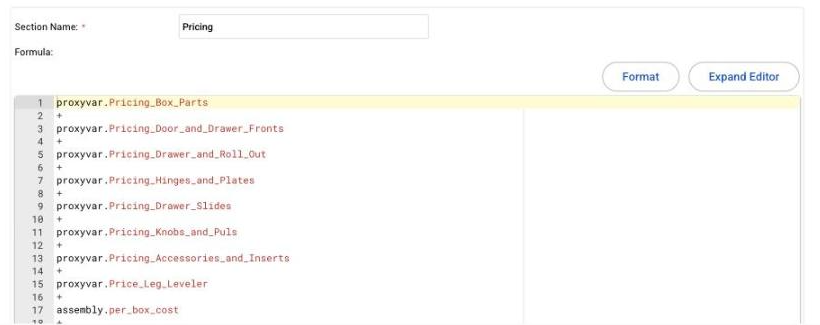
Open any cabinet product's Pricing tab and you'll find a single section:
proxyvar.Pricing_Box_Parts + proxyvar.Pricing_Door_and_Drawer_Fronts + proxyvar.Pricing_Drawer_and_Roll_Out + proxyvar.Pricing_Hinges_and_Plates + proxyvar.Pricing_Drawer_Slides + proxyvar.Pricing_Knobs_and_Puls + proxyvar.Pricing_Accessories_and_Inserts + proxyvar.Price_Leg_Leveler + assembly.per_box_cost + install.per_box
The proxy variables live under Settings > E-Commerce > Proxy Variables in the category 0 - Pricing. Because every cabinet uses the same ones, a change there reaches the whole catalog; see Proxy variables.
The four pricing methods
Each pricing proxy variable looks at the pricing_id column of its controlling attribute and uses the matching method. The box formula supports all four; the others use the first two or three.
pricing_id |
Method | How it works | Example |
|---|---|---|---|
| 1 | Incremental | A price table stepped by cabinet width (and by door type for boxes) | cabinet_width <= 12 ? 250 : (cabinet_width <= 15 ? 300 : ...) |
| 2 | Square foot cost plus margin | Every part's square footage times the material's cost per square foot, times (1 + waste yield), then times (1 + margin). Labor is usually in the margin | ((parts.left_end.Width * parts.left_end.Length) / 144) * (1 + box_material.waste_yield) * box_material.cost_per_sqft |
| 3 | Lineal foot | Width in feet times a lineal foot rate | (cabinet_width / 12) * construction_type.lineal_ft_price |
| 4 | Per box | One flat price per cabinet | construction_type.per_box_price |
A pricing_id of 0 means that part adds nothing, which is how you switch a part off (for example hardware a customer supplies).
Pick one method per part and keep it the same across the catalog. Mixing methods between products makes the catalog hard to maintain; mixing them between parts (square foot boxes, per-door fronts) is normal.
What each proxy variable prices
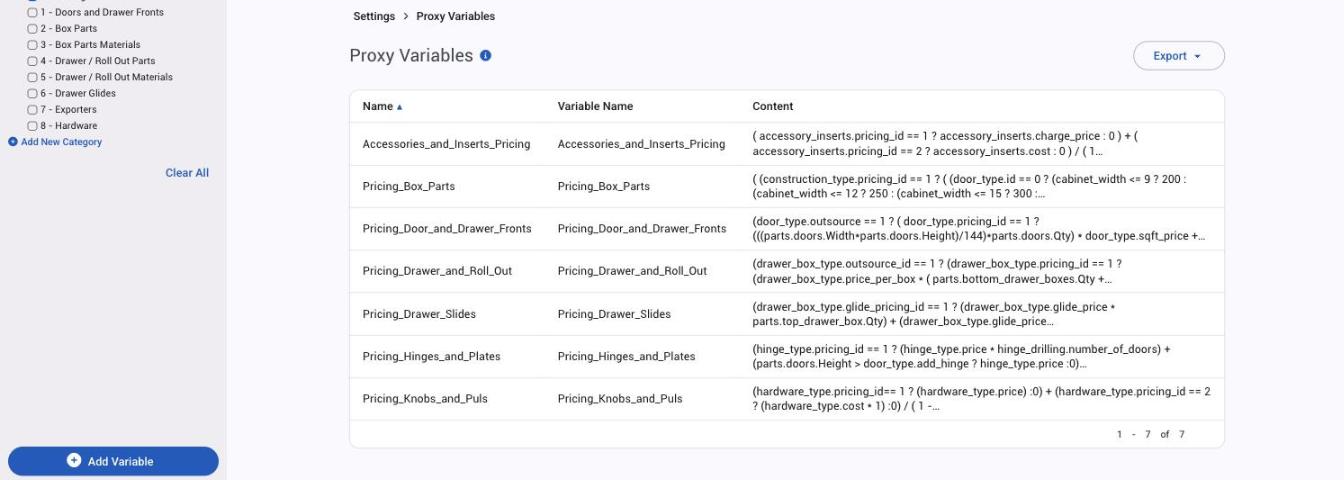
| Proxy variable | Controlled by | What it reads |
|---|---|---|
Pricing_Box_Parts |
construction_type.pricing_id |
Method 2 sums ends, top, deck, stretchers, nailers, apron, blind panel, toe, sleeper, shelves, partition and back from box_material (or integrated_end_material for integrated ends), plus edgebanding lineal feet at edgebanding.cost_per_ft, then applies box_material.margin. Methods 1, 3 and 4 use the table, lineal_ft_price or per_box_price on Construction Method |
Pricing_Door_and_Drawer_Fronts |
door_type.pricing_id and drawer_front_type.pricing_id, only when outsource is 1 |
Method 1: square feet times sqft_price on the type plus sqft_price on the finish. Method 2: square feet times door_material_finish.sqft_cost, waste and margin, plus edge banding perimeter when the finish's material_validator is 1. Method 3: base_price plus square feet above sqft_overage at sqft_price |
Pricing_Drawer_and_Roll_Out |
drawer_box_type.pricing_id, when outsource_id is 1 |
Method 1: price_per_box times the number of drawer boxes and roll outs. Method 2: side and bottom material by square foot from drawer_box_material and drawer_box_bottom_material with waste and margin, and the height-tier costs h1_cost to h10_cost |
Pricing_Drawer_Slides |
drawer_box_type.glide_pricing_id |
glide_price times the number of drawer boxes and roll outs |
Pricing_Hinges_and_Plates |
hinge_type.pricing_id |
price (or cost times 1 + margin) times hinge_drilling.number_of_doors, plus one extra hinge when the door is taller than door_type.add_hinge |
Pricing_Knobs_and_Puls |
hardware_type.pricing_id |
price, or cost / (1 - margin) |
Accessories_and_Inserts_Pricing |
accessory_inserts.pricing_id |
charge_price, or cost / (1 - margin) |
assembly.per_box_cost, install.per_box |
the Assembly and Install options | Flat amount per cabinet |
Where to change prices
- Material costs and margins: the columns on Box Material, Front Material / Finish, Back Material, Drawer Box Material and Drawer Box Bottom Material (
cost_per_sqftorsqft_cost,waste_yield,margin). Open the attribute under Settings > E-Commerce > Product Attributes and edit the cells. - Per-door and per-box rates:
sqft_price,base_priceandsqft_overageon Door Type and Drawer Front Type;price_per_box,glide_priceand the height-tier costs on Drawer & Roll Out Type;price,costandmarginon Hinge Type, Hardware Type and Accessory / Inserts. - Switch method: change
pricing_idon the controlling attribute's options (every option of that attribute should use the same method). - Shop-wide markup: use a price adjustment for All Companies rather than editing columns; see Price adjustments.
- One product priced differently: use Edit Overrides on that product to give its options different column values.
After a change, open a cabinet's Pricing tab with ?dev=1 and use Test Form to see each proxy variable's result; see Test and fix a pricing formula.
Things to know
- Every price column needs a value. A blank cell in a column a formula reads makes the cabinet show "-" on the order. Put
0in columns that don't apply. - Outsourced fronts and boxes. Fronts are priced by the template only when
door_type.outsourceis 1, and drawer boxes whendrawer_box_type.outsource_idis 1; otherwise the template assumes you price them elsewhere (for example as separate door products). - Part-size proxy variables in the other categories (Box Parts, Drawer / Roll Out Parts, Hardware and so on) calculate the part sizes the pricing reads, such as
Adjustable_Shelf_Length. Changing a construction column such asadj_shelf_gapchanges those sizes and so the price.