
Connect your own UPS or FedEx account at Settings > Operations > Shipping and Allmoxy asks the carrier for a live rate on every order, from your Ship From address to the customer's address, using the order's weight. You enter your carrier credentials and account number, set a max weight per package, switch on the services you want to offer (Ground, Express, Overnight and so on), and the rate shows on the order before the customer places it. A formula on each service can add a handling fee on top. This article walks through FedEx, FedEx Freight and UPS.
Applies to: catalog and itemized orders shipping to addresses in the US and Canada. Editing the Shipping page needs permission to edit site settings and supply locations. Project orders always report a weight of 0, so carrier rates don't work for them.
In this article
- What a carrier connection does
- Before you start
- Connect FedEx
- Connect FedEx Freight
- Connect UPS
- Turn on the services you offer
- Adjust the rate with a formula
- How to tell it worked
- Carrier errors and what they mean
- Things to know
What a carrier connection does
Allmoxy offers UPS (7 services), FedEx (5) and FedEx Freight (2). When an order is saved on one of those services, Allmoxy sends the carrier your Ship From address, the customer's address and the order's total weight, split into packages of at most your max weight per package, and the carrier returns a price for that service. More than 50 packages is refused, and the carrier can't rate an order whose weight is 0, so your products need weight formulas first. UPS rates are for a commercial address, and UPS checks the city, state and ZIP before it rates.
Allmoxy sends the total order weight only. Carriers typically use weight plus height, width and depth to price a shipment accurately, so a carrier connection is an estimating tool, not a perfect costing tool. The estimate will be off here and there and averages out over time; take this into consideration when you customize your carrier pricing with a formula. Carrier rates work only for destinations in the US and Canada.
Before you start
- Choose your Ship From / Will Call address at the top of the Shipping page; carrier rates start from it. See Set up your shipping methods.
- Give your products weight formulas, or the carrier has nothing to rate. See Write a shipping price formula for checking an order's weight.
- Have your carrier accounts ready. For FedEx you need your FedEx Developer account (you create one in the steps below if you don't have one) and your existing FedEx account profile, where your billing and shipping are managed. For UPS you need a UPS developer account.
- Decide your max weight per package: the heaviest single box or crate you ship. Allmoxy divides the order weight by it to decide how many packages to rate.
Connect FedEx
To connect FedEx, you generate API credentials in the FedEx Developer portal and paste them into your Allmoxy Shipping settings.
- Find your FedEx account number. Open your FedEx account profile and locate your account number under Contact Information (or in the Billing/Payment area). You'll need it in a few steps.
- Add your shipping account in the FedEx Developer portal. Log in to the FedEx Developer portal, go to Organization > Shipping Accounts and add your account. The address you enter here must match your FedEx profile exactly. A mismatched address is the most common reason FedEx setup fails; even a small difference in formatting can cause it.
- Create the shipping API project. Under Projects, create a new project for "Ship with FedEx". When the list of available APIs appears, select Rates and Transit Times API and Freight LTL API. Click Next, choose your country, and attach the shipping account you just added. Click Next again to move on to the keys screen.
- Copy the Production keys. On the keys screen, make sure you're on the Production tab, not Test. Test keys look like they're working during setup, but they won't process real shipments or return real rates. Copy both the API Key and the Secret Key from the Production tab.
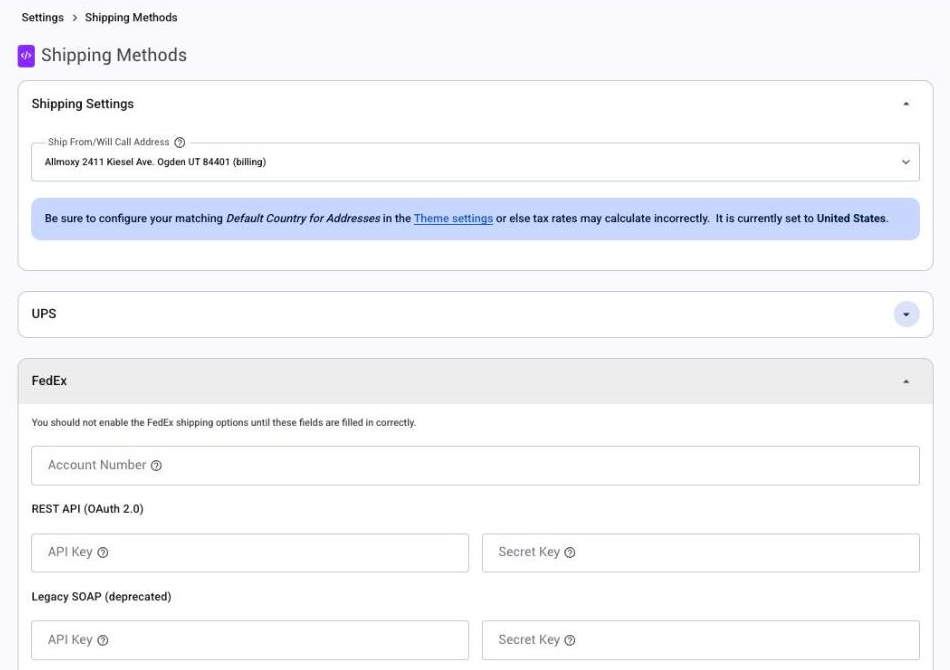
- Paste everything into Allmoxy. Go to Settings > Operations > Shipping and open the FedEx section. Enter your FedEx Account Number, then under REST API (OAuth 2.0) paste the API Key and Secret Key. Leave the Legacy SOAP fields alone unless support asks for them. Enter your max weight per package.
- Save. Allmoxy tests the credentials as it saves. If the test fails you see an error, but the settings are kept, so fix the keys and save again.
Then switch on the FedEx services you want to offer (see Turn on the services below). The section itself warns you not to switch FedEx services on until these fields are filled in correctly.
Connect FedEx Freight
FedEx Freight (LTL) rates pallets rather than packages, and it needs a few more things in the FedEx section of the Shipping page:
- Freight Account Number.
- Freight Shipping Address: a ship-from address used as the origin for freight rates instead of your Ship From address. Pick the dock the pallets actually leave from.
- Freight Class, picked from a list that runs from 50 to 500. If you're not sure which class your shipments use, ask your FedEx representative.
- Max Weight Per Pallet. Allmoxy divides the order weight by it to decide how many pallets to rate.
The Freight LTL API you selected in the FedEx project is what makes these rates possible. Offering it alongside Ground gives customers an informed choice, and they tend to pick the most economical option, which is typically the best one: FedEx Freight over Ground to ship multiple pallets of assembled product, for example.
Connect UPS
- Create a UPS developer account if you don't have one, and log in to it.
- Find your Client ID and Client Secret in the UPS developer portal. (Allmoxy still accepts the older UPS username, password and access key if your site was connected that way, but new connections use the Client ID and Client Secret.)
- Paste them into Allmoxy. Go to Settings > Operations > Shipping, open the UPS section, and enter the UPS Client Id and UPS Client Secret. You'll also need to enter your UPS Account Number and Max Weight Per Package. (The UPS Username, UPS Password and UPS XML Access Key fields are for the older connection.)
- Save. Allmoxy tests the credentials as it saves; an error means UPS rejected them, though the settings are kept. UPS services can't be switched on until a Client ID and Client Secret (or an access key) are saved.
- Add rating to the Allmoxy app at UPS. Once connected, you should see Allmoxy listed under My Apps in your UPS developer account portal. Open the Allmoxy app there and search for the Rate Calling product to add it to the app. That product is what sends the order information from Allmoxy to UPS for a rate estimate.
Two UPS rules to know: the next-day services are refused when the customer's ZIP is the same as your Ship From ZIP, and when the city, state and ZIP on an order don't match, UPS answers "perhaps you meant ..." with its suggestion instead of a rate. Correct the address and save again.
Turn on the services you offer
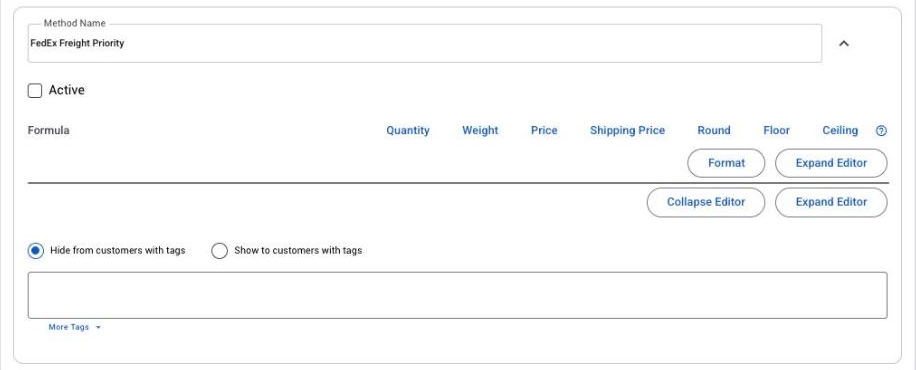
After saving your credentials, each UPS and FedEx service appears as its own method card in the UPS or FedEx section of the Shipping page: UPS Ground, 3 Day Select, 2nd Day Air, Next Day Air Saver, Next Day Air, Next Day Air Early AM and UPS Standard; FedEx Ground, Express Saver, 2nd Day, Priority Overnight and Standard Overnight; FedEx Freight Economy and Freight Priority. Tick Active on each service you'd like to offer; only active services appear as options for your customers at checkout. Most shops offer one ground service and one faster service for rush jobs. You can't rename the carrier services, but you can hide any of them from some customers with the method's tag rule, like a custom method.
Adjust the rate with a formula
Each carrier service has a formula box, and in it the word shipping_price is the carrier's live rate. With the formula left blank, the customer pays the carrier's rate as it is. To add handling, packaging or a margin, write a formula around it:
shipping_price + 15adds a $15 handling fee: a $212.40 carrier rate becomes $227.40.shipping_price * 1.1adds 10 percent.ceil(shipping_price / 5) * 5rounds the rate up to the next $5.
The formula can also use price, quantity and weight, and the functions round, floor and ceil, but not distance, which only custom methods can use. The full list and more examples: Write a shipping price formula.
How to tell it worked
- Save the Shipping page and read the message: a credential error here means the carrier rejected your keys or account number.
- Open a test order for a customer with a complete US or Canadian address, add a product that has a weight, and pick one of the carrier services. A rate appears in the estimate under the method picker; a carrier error appears in the same place.
- Save the order and check the shipping line. The saved amount is the one that counts, and a carrier error on save gives $0 shipping with no warning.
- For UPS, confirm Allmoxy appears under My Apps in your UPS developer portal with the rating product added.
Carrier errors and what they mean
- "The shipping method you selected is not available": the carrier didn't return a price for that service on this shipment. Try another service; if every service fails, re-check your credentials and account number.
- "No weight found": no product or supply on the order has a weight. Add weight formulas to the products, or use a custom method for that order.
- "Perhaps you meant ...": UPS says the city, state and ZIP don't match. Correct the address.
- Shipping saved as $0 with no message: an address outside the US and Canada, more than 50 packages, or a carrier error during the save. Pick the method again on the order to see the error under the picker.
Every cause, in order, with what to send support: Shipping shows $0 or the wrong amount.
Things to know
- It's an estimate. Allmoxy sends weight only, never box dimensions, so expect the carrier's invoice to differ a little; adjust your formula over time.
- Fill in the max weight per package (and max weight per pallet for freight). Allmoxy needs it to split the order into packages before it can ask for a rate.
- Production keys only. FedEx Test keys pass setup but never return real rates.
- No labels or tracking. The connection prices shipping; printing labels and tracking packages are not available in Allmoxy.
- A paid order recalculates only when its method or address changes, and a Shipped order is frozen, so a rate change at the carrier doesn't touch orders already placed.