
Each of your three lists (companies, company contacts and individual accounts) has an export menu that gives you a printable PDF, a list of email addresses, or a CSV. Allmoxy doesn't send newsletters or mass email, so to email everyone you export the addresses to your own email tool, or post one announcement to all customers. Filter the list first so you export only the people you mean.
Applies to: every shop. You need to see the list you're exporting: View other companies for companies, View user not in their company for contacts outside your own company.
In this article
- Export your companies
- Export your contacts and individual accounts
- Email all your customers
- Things to know
Export your companies
- Go to Contacts > Companies.
- Filter the list to the companies you want: Status, Show (Customers, Vendors, Others), tags and so on.
- Click Export above the list and pick one of the three exports.
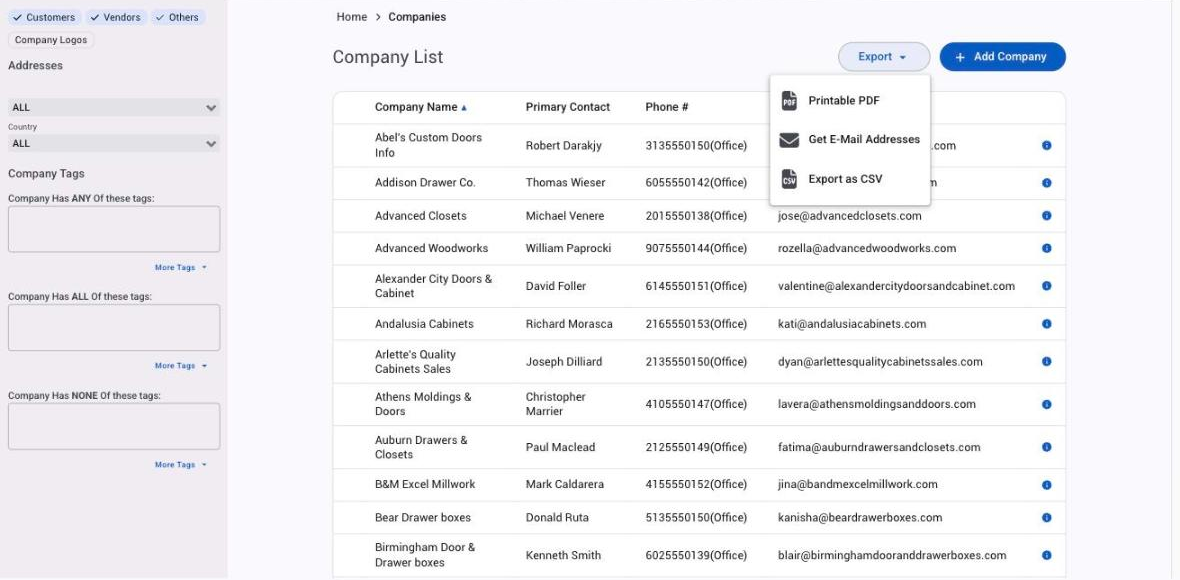
The three exports:
- Printable PDF: a printable view of the company list.
- Get E-Mail Addresses: each company's primary email address.
- Export as CSV: a spreadsheet with each company listed, including their Allmoxy settings information, contact information and addresses.
Export your contacts and individual accounts
- Go to Contacts > Company Contacts for the people at businesses, or Contacts > Individual Accounts for personal customers. The two are separate lists: individuals are never on the Company Contacts list, and the Company Contacts list includes your own employees and your vendors' people unless you filter it.
- Filter first. Use the Show chips (Customers, Vendors, Others) and the status filter so you don't send your newsletter to your own staff or your suppliers.
- Click Export above the list and pick Printable PDF, Get E-Mail Addresses or Export as CSV, the same choices as on the Companies list.
- Repeat on the other list if you want everyone.
Email all your customers
Allmoxy does not offer a bulk mail or mass mail option, so if you need to send a single email to all your customers your choices in Allmoxy are limited. You have two:
- Export the addresses and use your own email tool. Go to Contacts > Company Contacts, filter to Customers, and use Get E-Mail Addresses from the Export menu; then do the same on Contacts > Individual Accounts. Use the files with your mail merge or newsletter tool to send mass email updates or newsletters to your customer base. This is the way to go for anything designed, scheduled or tracked.
- Post one announcement to every customer. Go to Add > Announcement and tick Customers in Choose Contacts, which selects every customer company and the contacts under it. The announcement shows in Allmoxy the next time each person signs in and is also emailed or texted to them per their own notification settings. Companies with no active contact who has a username are left out. See Use notes, tasks and announcements.
Triggers and actions can send an email too, but only when an event happens (an order is placed, a payment comes in, a new company is created), not as a one-off message to everyone. See Intro to triggers.
Things to know
- Get E-Mail Addresses on Company Contacts is not every address in your site. Individual accounts have their own list and their own export, and the Company Contacts list holds your employees and vendor contacts too. Filter, then export, then repeat on Individual Accounts.
- The Companies export gives one address per company, its primary email. For every person who can sign in, export Company Contacts.
- Allmoxy sends its own emails per person. Welcome emails, order and invoice emails, and task and announcement notices go out based on each person's notification settings; see Emails Allmoxy sends and who gets them.