
Every order with exportable parts has a download link for each exporter you have set up. The link is on the order's output pages, and the file goes wherever your browser saves downloads.
Applies to: anyone sending an order to a saw, CNC or other software. Customers see the link only for exporters set to Show Customers.
In this article
Download the export file
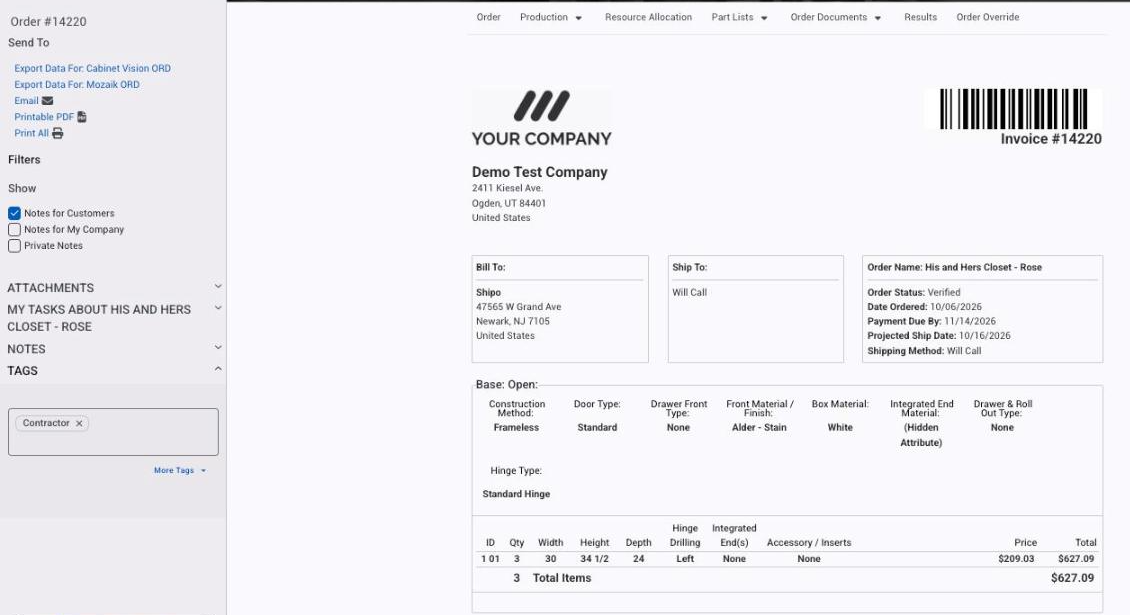
- Go to Orders, find the order and click its number or name.
- Click any output page tab across the top, such as Invoice (or open one from the Part Lists or Order Documents menu).
- In the Send To panel on the left, click Export Data For: (exporter name). There is one link per exporter.
The file downloads with the name and extension set on the exporter.
Save it to a network folder
Where the file lands is a browser setting, not an Allmoxy one. Set your browser's download location to the folder your saw or software watches, and every export saves straight there. In Chrome it is under Settings > Downloads; other browsers have the same option under a similar name.
Things to know
- No link for the exporter you expect? None of the order's parts has an export formula for it. See Exporters.
- To export many orders at once, use Orders > Batch Orders.