
The footer is the strip at the bottom of every printed page of an output page. It is the place for a company name, a return policy, a disclaimer or a date stamp, because footer content repeats on every page: a three-page cut sheet carries it three times. Allmoxy has built-in footer settings for the order number and the date, and a set of date and time variables for anything custom.
Applies to: anyone editing output pages. Needs the Manage Catalog permission. Pages live under Settings (gear) > E-commerce > Output Pages.
In this article
Turn on the built-in footer
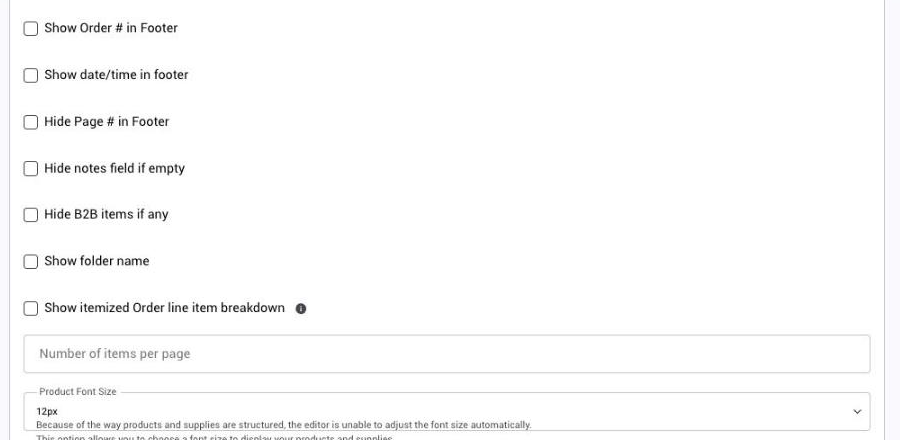
Open the page and find the Contents section.
- Show Order # in Footer prints the order number on the left of every printed page.
- Show date/time in footer prints a stamp on the right. Tick it and choose Date & Time, Date Only or Time Only.
- Hide Page # in Footer removes the "Page 1 of 3" text if you don't want it.
The stamp shows the moment the page is generated, so a printed or emailed PDF carries the date it was made. That is what you want for a "printed on" stamp.
Date and time variables
For more control over where the date sits, or to combine it with text, use the date variables from the black sidebar. Click into the editor and click the name to insert it.
| Variable | Prints |
|---|---|
| Current Date | Today in short numeric form, such as 6/4/2026 |
| Current Date (Long) | Today written out, such as June 4, 2026 |
| Current Time | The current time |
| Current Time (24-hour) | The current time in 24-hour form |
| Current Date & Time | Both together |
| Current Day | The day part only |
| Current Month | The month part only |
| Current Year | The year part only |
They fill in each time the page is generated, so "Printed: {current_date}" always shows the real print date.
Add your own footer in HTML
For a multi-line address block, a disclaimer or your own styling, build the footer in the page's HTML. Click Source in the editor, scroll to the bottom of the code and add a footer block with your own content:
<footer>
<p>Here's my footer content...</p>
</footer>
Date and time variables work inside the footer HTML too. Everything after the {products} variable in the layout repeats at the bottom of each printed page.
Things to know
- The built-in order number and date settings and a custom HTML footer can be used together.
- Check the result with Printable PDF on an order; the footer only repeats in print and PDF, not on screen.