
An internal use product is hidden from your customers' catalog but your team can add it to any order. Use it for anything you charge that customers shouldn't pick for themselves: design fees, freight, installation, rush charges, custom work, or a one-time setup or tooling fee.
Applies to: every shop. Tick Internal Use Only on the product; anyone who can edit orders can then add it.
In this article
- Make a product internal
- Add one to an order
- One-time charges: setup, tooling, rush
- What customers see
- Things to know
Make a product internal
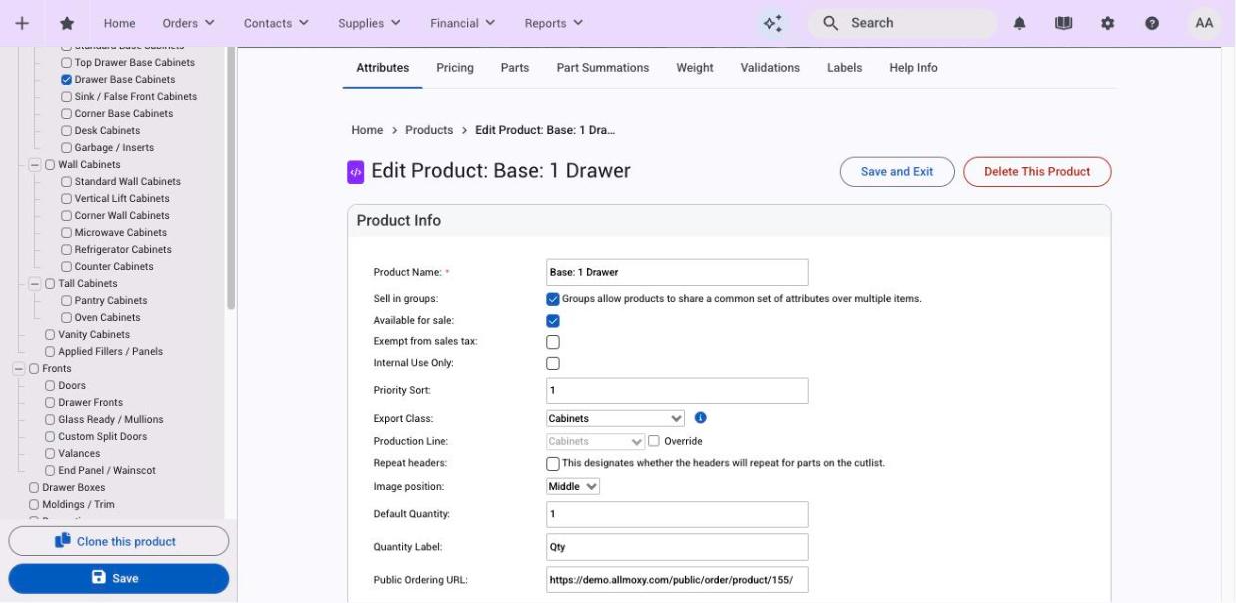
- Open the product at Settings > E-Commerce > Products (or create one; see Create a product).
- Tick Internal Use Only and Save.
The product disappears from the customer catalog and stays in yours. Everything else about it works as normal: attributes, pricing formulas, overrides, categories, tax exemption and validations. Ticking it also turns off Allow B2B access, so an internal product can't be resold by another shop.
To see all your internal products, tick Internal Use Products in the product list's sidebar. It combines with the other filters.
Add one to an order
- Open the order.
- Add the product the way you add any product: search for it by name or open the category it's in.
- Fill in its attributes, quantity and price as needed.
- Save the order.
You can add internal products alongside regular ones, add the same one more than once, and add them at any order status except Shipped. No extra permission is needed beyond editing orders.
One-time charges: setup, tooling, rush
Attributes and price adjustments always work per item, so a charge that applies once per order is an internal use product. Make a product called "Setup fee" or "Tooling charge" with a pricing formula that returns the amount (or a number attribute your team types the amount into), mark it internal, and add it to the orders that need it.
If someone needs reminding to add it, a trigger that fires when a particular option is chosen can send the reminder. For a charge that depends on quantity, such as "add $20 if fewer than 10 doors", build it into the product's pricing formula instead; see How Allmoxy prices a product.
What customers see
As soon as the order is saved, the product is on the customer's order like any other line, and it appears on invoices, quotes, packing lists and production documents. Nothing marks it as internal.
On the order page the line is read-only for the customer: a lock icon next to the name, the fields disabled, and a note that the item cannot be modified. They can't change its quantity or attributes, remove it, or copy it. They can still open the info icon and expand its details.
Things to know
- Duplicating an order leaves internal products out. They're usually specific to one job, so add them again to the copy.
- Internal products follow your validation rules like any other product.
- Keep them in a category your team will find, or rely on search by name when adding them to an order.