
You'll have questions for us, and we want you taken care of right away. The fastest answers are usually in this help center or from Mox Bot, the chat assistant that reads it for you. Inside Allmoxy, the Support Center (the question mark icon in the top bar) holds a setup checklist, the Report a Bug chat, this help center and your tickets. For anything bigger, your Customer Success contact is your main point of contact, and Allmoxy's implementation team can be hired to build or fix your catalog. This article lists each option, fastest first.
Applies to: everyone with an Allmoxy login. Your plan decides your support level; the channels below are the same for every shop.
In this article
- Search this help center
- Ask Mox Bot
- Use the Support Center inside Allmoxy
- Talk to your Customer Success contact
- Get paid help building your catalog
- Billing and account questions
- Things to know
Search this help center
The help center is one of the fastest ways to a complete answer. Use the search box at the top of any page, or browse by category from the home page. Articles say who they apply to and which permission or setting they depend on, so you can tell quickly whether one fits your shop.
Ask Mox Bot
Mox Bot is Allmoxy's chat assistant. Ask it a question in plain words and it pulls the answer together from across the help articles; if it can't get you there, it hands you to a person. You'll find it in two places: the chat bubble in the corner of this help center, and the Report a Bug tab of the Support Center inside Allmoxy (next section).
Use the Support Center inside Allmoxy
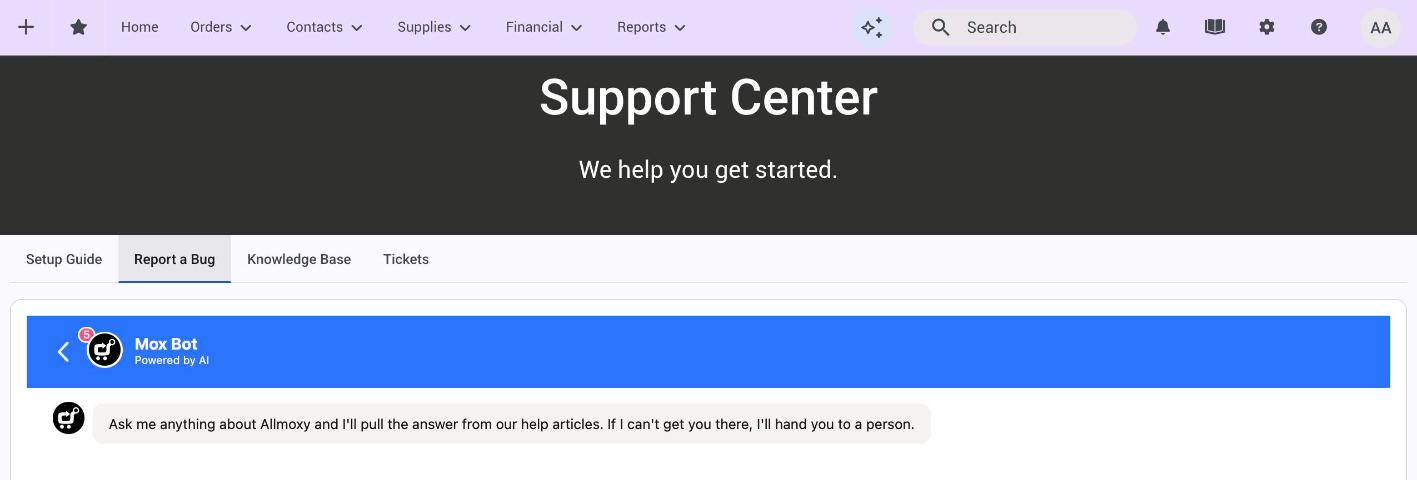
Click the question mark icon in the top bar of any Allmoxy page (its tooltip says Support). The Support Center has four tabs:
- Setup Guide: a checklist of the things a new shop sets up, grouped as Initial Tasks (beginner), Automation Training (intermediate) and Customize Your Instance (advanced). Each item opens the settings page it configures, and you only see the steps your permissions allow. It is the same checklist on every shop, so it doubles as a tour of what Allmoxy can do.
- Report a Bug: a live chat with Allmoxy, inside the page, with Mox Bot answering first. Use it to report a problem (what to include: Report a bug to Allmoxy) or to ask a quick question.
- Knowledge Base: this help center, without leaving Allmoxy.
- Tickets: your open tickets with Allmoxy.
If your shop has Operator, it answers questions about your own data (orders, customers, sales) from inside Allmoxy, within your permissions: Guide: Operator. Operator is for your data; the Support Center is for Allmoxy itself.
Talk to your Customer Success contact
If you have an active account, you have been assigned a Customer Success contact, and they are your primary point of contact. They can report a bug for you, answer questions about how Allmoxy works, consult on best practices, and help you decide whether you need our services team or our development team. If you aren't sure who yours is, ask in the Report a Bug chat and we'll connect you.
Get paid help building your catalog
Allmoxy's implementation specialists build catalogs for a living. If you need help with your catalog, including pricing, part calculation, exports to machines, or weight and shipping calculations, this is the team to ask for. Their time is charged, so a signed services agreement is needed before a meeting is scheduled. Start with your Customer Success contact and they'll set it up.
Billing and account questions
Your subscription, your card on file and your payment history are on Settings > Admin > Account Settings: Manage your Allmoxy subscription and billing. If everyone at your shop sees an "account suspended" message, that is the subscription, not a bug: the message shows the number to call, or use the Report a Bug chat.
Things to know
- Fastest first. Search here or ask Mox Bot before you open a chat; most "how do I" questions are already answered.
- The Support Center is behind the question mark icon in the top bar. It isn't in the main menu.
- Report bugs with the page address and a screenshot. It cuts the back and forth in half: Report a bug to Allmoxy.
- Your own customers have a different chat. The chat widget you can add for your customers (Set up a support chat for your customers) is yours, not Allmoxy's. Allmoxy support doesn't see it.
- Your plan decides your support level. If you want more hands-on help than your plan includes, ask your Customer Success contact what the options are.