
Most of this is in the Terms and Conditions you accepted when you signed up, but here are the highlights. Your shop has its own database that no other shop can reach, card details are held by Stripe rather than Allmoxy, only people on your own employee list can get into your shop, and we will never sell or share your information or your customers' information without your written consent. This article also covers how to export your data and where to read the terms.
Applies to: every Allmoxy shop. Nothing here needs a setting; the sign-in and export sections link to the pages where the settings are.
In this article
- Will you share my information or my customers' information?
- How your data is protected
- Can I download everything as a backup?
- What happens if Allmoxy closes? Do I lose everything?
- Read Allmoxy's Terms and Conditions
- Things to know
Will you share my information or my customers' information?
No. Allmoxy will never sell, trade or transfer your information or your customers' information to other clients or other parties. We will only share your information if we have written consent from you first.
How your data is protected
- Your own database. Every shop runs on its own database and its own file folder. Other shops run the same software, but none of them can reach your data, and nothing you haven't published is visible to anyone outside your shop.
- Card details stay with Stripe. When you or your customers enter a card, the number goes straight to Stripe and is never stored in Allmoxy. That is also why card numbers are not part of any export: card industry rules (PCI) require it, and it means a stolen export can't carry card data.
- Every page is served over an encrypted connection (HTTPS), so data moving in and out is protected.
- Backups. Your database is backed up on a schedule and copies are kept so that it can be restored.
- Sign-ins are checked against your employee list. A person can only use your shop while their contact is Active, their company is Active and Allow this person to log in is on. Turn one of those off and they are signed out on their next page. Sessions end after a period of inactivity unless the person ticked Remember Me on a trusted computer. How to set up and remove logins: Add an employee and set up their login.
- Access by Allmoxy is recorded. Your administrators can view the app as another person to check what they see (Hijack), and Allmoxy support staff can enter your shop to help with a problem. Both are recorded every time.
- Fake sign-ups. We also keep preventative measures in place to stop bots from creating fake customer accounts on your shop.
Can I download everything as a backup?
Most of it, yes:
- Customers and contacts: export companies and contacts to CSV from the Contacts pages: Export customers and contacts out of Allmoxy.
- Supplies: export your supply list from the Supplies pages.
- Invoices, sales orders and credit memos: the export queues under the Financial menu.
- Reports: every report exports to CSV: Export a report to CSV or PDF.
- Every order, automatically: with Zapier (or a trigger with a webhook) you can send each order to a spreadsheet or another system as it happens: Connect Allmoxy to Zapier and build your first Zap and Get your data out of Allmoxy.
What can't be downloaded is card data (previous section).
What happens if Allmoxy closes? Do I lose everything?
If Allmoxy closes, we will hand all of your information back over to you. Your data is yours.
Read Allmoxy's Terms and Conditions
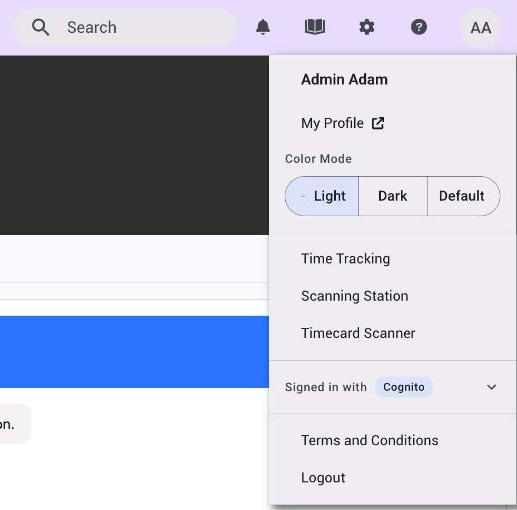
- Log in to your shop.
- Click your initials (avatar) in the top right corner.
- Click Terms and Conditions. A dialog opens with Allmoxy's terms for using your shop, which name your shop and Allmoxy LLC together. These are the terms a person agrees to when they sign up or first sign in.
The Terms and Conditions do not include your contractual agreement. Contact Allmoxy Sales, or your Customer Success contact, if you need a copy of your original agreement or of Allmoxy's current software terms.
Your own order terms, the ones a customer agrees to when they place an order with you, are a separate text that you write on Order Settings. See Your terms and conditions: write them and choose when customers agree.
Things to know
- Your shop's data is its own. Own database, own folder, no cross-shop access.
- Card numbers are never in Allmoxy, so they are never in an export either.
- Logins are yours to control. Inactive contact, inactive company or "Allow this person to log in" off, and the person is out.
- Allmoxy's access to your shop is recorded, and so is your administrators' Hijack.
- Export what you need, when you need it. Contacts, supplies, invoices and every report go to CSV; Zapier sends orders as they happen.