
Nearly every "my trigger didn't fire" comes down to one of a handful of causes: the trigger is off, the status or target didn't match, an extra condition failed, or the recipient was skipped because they are inactive or have no email address. The Trigger Call Log shows what a trigger sent and whether it failed; a trigger that didn't match, or skipped every recipient, leaves no row at all. Several emails at once mean one save crossed several statuses or two triggers matched. This article walks through the log first, then the causes in the order we see them, then two questions we get a lot: why a company is "not available" as a target, and whether you can fire a trigger by hand (no, and here is why).
Applies to: every Allmoxy site and every order type. Reading the Trigger Call Log needs the Trigger History permission; changing a trigger needs Add/edit site triggers.
In this article
- Check the Trigger Call Log first
- It didn't fire: causes, most common first
- It fired twice, or the customer got several emails at once
- It sent the wrong thing
- "The company is not available as a trigger target"
- Can I fire a trigger by hand?
- Still stuck? What to send support
- Things to know
Check the Trigger Call Log first
Open Reports > Managerial > Trigger Call Log (it is also listed in the Available Reports rail). It needs the Trigger History permission, so if you can't see it, ask whoever manages permissions on your site.
The log lists one row for each thing a trigger did: the trigger, the event, the action, Success or Failed, and when it ran. The info icon on a row shows the conditions the trigger checked and what it sent. Filter by Event date, Status, Event, Action or Trigger; it opens on the last seven days, so widen the date range when you are looking further back. Rows can take up to 10 minutes to appear, so give a fresh test a few minutes before you decide it didn't run.
The quickest route is from the trigger itself: open it at Settings > Operations > Triggers and use its Trigger Call Log link, which opens the log already filtered to that trigger. That also settles which of two similar triggers fired.
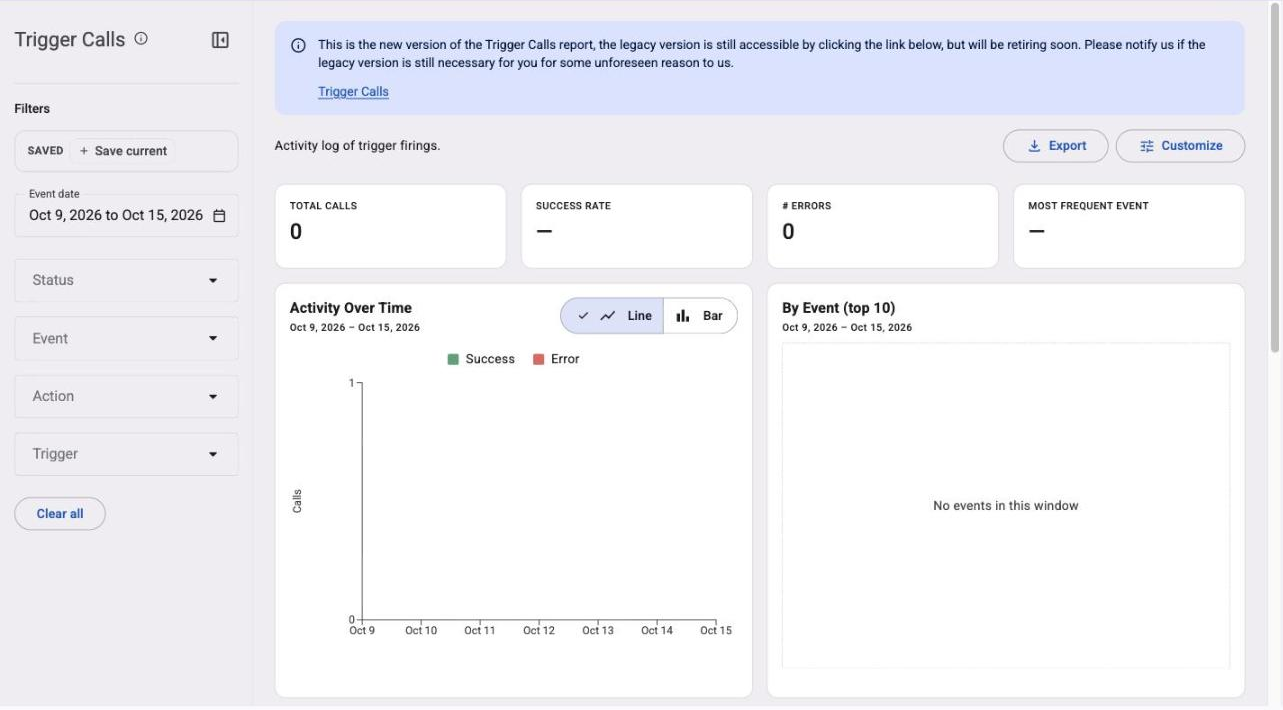
If the report opens on a newer view that is empty, out of date or shows an error, use the Trigger Calls link in the notice at the top of the report; the legacy view it opens reads the live data.
One thing the log never shows: a trigger that didn't match. A failed target or condition, an inactive contact, a contact without an email address or text number, and a tagged recipient from another company all write nothing. So "nothing in the log" means the trigger didn't get as far as sending, not that the event didn't happen.
It didn't fire: causes, most common first
- The trigger is Inactive. Open it and check its status; the Triggers list can be filtered by Active or Inactive. Template triggers that come with your site all start inactive.
- The status list doesn't match. On Order Status Changes To, the status the order moved to must be ticked. Remember that an order which jumps several statuses in one save passes each one, so a trigger on Verified fires when a bid goes straight to In Progress, but a trigger on Ordered does not fire when an order comes off On Hold straight to Shipped. On a site with project orders and another order type, project orders match only the project statuses (Bid, Authorized, Confirmed, In Production, Ready To Install, Shipped, Installed, Void, On Hold), so tick those for project orders. See Guide: Order status in Allmoxy.
- The target doesn't match. A trigger aimed at one company skips every other company, and a trigger that uses company tags skips any company that doesn't carry at least one of them. Open the customer company and check its tags; for a note, an attachment or a process clock, the company is the one on the order or record it belongs to.
- An extra condition failed. Extra conditions are checked on four events only (Order Status Changes To, Remake Status Changes To, Order Process Started and Order Process Ended), and all of them must hold: the product, product attribute, order tag, B2B item and shipping method on the order have to match every line. Check the order's products and tags against each condition. If you combine a Shipping Method condition with others, list it last.
- The recipient was skipped. A contact who is inactive or has no email address gets nothing and leaves no row. Open the contact on the customer company and check both. For a sales rep who isn't in the employee list, see Choose who gets a trigger's email.
- The event wasn't the one you think. Ship Date Modified fires only when an existing order is saved with a changed date, not for new orders; New Supply Created fires from the full New Supply form only; Order Past Due By runs once a day and fires on one exact day, counted from the invoice's charge date plus the grace days on the company's payment term, so a company with no payment term never matches (timing is in Email invoices and payment reminders automatically). The full list is in Trigger events, conditions and message variables: reference.
- The save showed an error. If the person saving saw "'<trigger name>' trigger has missing or invalid data and couldn't be fired.", the action hit a problem (a bad address, a number that couldn't be used, a web address that didn't answer) and was logged as Failed; the rest of that trigger's recipients were skipped, but other triggers on the same event still ran. The info icon on the Failed row says what went wrong.
- Success in the log, nothing in the inbox. The email left Allmoxy and was lost afterwards: spam, a bounce, or a problem with your sending domain. Check the Email Log and Ensure your Allmoxy emails send properly.
It fired twice, or the customer got several emails at once
Triggers are not deduplicated, so there are two ways to get more than one email from one event.
One save crossed several statuses. An order moved several statuses in one save fires Order Status Changes To once per status it passes (the ladder is Bid, Ordered, Verified, In Progress, Completed, Shipped), so a customer with an email on each status gets several at once. Open the order's status history: rows with the same time are one save. Moving an order back and forward again fires again too. The fix is to narrow each trigger's status list to the statuses the customer should hear about, or to put the message on one status only.
Two triggers match the same event. Two triggers that both listen for the same status and both target the customer both run, and the Trigger Call Log shows one row per trigger. Filter the log by the time of the event to see every trigger that fired, then merge the two or set one to Inactive. Each trigger's own Trigger Call Log link is the quickest way to tell them apart.
It sent the wrong thing
- A variable came through as typed, such as {delivery_date} printed literally: the event doesn't have that variable. The list beside the editor is kept by hand and can show a variable the event doesn't fill, so check the event's variables in the events reference and send yourself a test.
- It went to the wrong person: check whether the trigger uses the primary contact (one fixed person per company) or the Order Contact (whoever placed that order), and whether it uses recipient tags, which replace every other recipient on the trigger. See Choose who gets a trigger's email.
- The customer replied and nobody saw it: the trigger's Reply Address field is empty, so replies went to Allmoxy's notification address. Put your office address in the Reply Address field.
- The attachment was missing: open the trigger and check its output pages and export files are still ticked, especially on a trigger that was cloned. When an attachment fails to build, the log shows a Failed row for it and a Success row for the email, which went out without the attachment.
- A text message didn't arrive: see Send a text message with a trigger.
"The company is not available as a trigger target"
Make sure that company has a primary contact set up who has an email address.
The primary contact matters in two ways. A trigger whose recipient is the primary contact for account skips the company silently when the primary contact is missing, inactive or has no email address, so the company gets nothing and the log shows nothing. And if the company you want isn't offered when you pick one company as the target, the first thing to check is that same primary contact and their email. Open the company, confirm who the primary contact is and that their contact record has an email address, then save and try the trigger again. Setting up a company's contacts is covered in Guide: Customers in Allmoxy.
If the company has a primary contact with an email address and still doesn't appear as a target, send the company name and the trigger to support in the chat and we will look at it with you.
Can I fire a trigger by hand?
In short, no. There is no button that runs a trigger on a record you choose.
Manually forcing a trigger would require changing the status or other information that would prompt the trigger to fire, and that disrupts the order flow and all the background processes that depend on the order status. Most noticeable to you, it changes the dates the order was moved through those statuses, which affects any reports you pull for those orders. It also runs every other trigger on that status again, so the customer can get a second copy of every email on it, and moving an order to Shipped again can resend the invoice email.
If you need to test a trigger, cause the event on a test order or a test company and watch the Trigger Call Log. If an email never went out and the customer needs it, send it by hand from your mail program. And if you think you've found a way to force a trigger to fire without disturbing dates or statuses, run it by us in the support chat and we'd be happy to think it over with you, to make sure it doesn't interrupt the normal flow of business.
Still stuck? What to send support
If the trigger's status, target, conditions and recipients all look right and the log still shows nothing, open the support chat and send us:
- The trigger's name and number from the Triggers list.
- The order, company or record it should have fired for, and the date and time of the event.
- What you expected to happen and who should have received it.
- What the Trigger Call Log shows for that trigger and day (a screenshot is ideal), and whether you looked at the legacy view.
- For an email that shows Success but never arrived, the Email Log row for it.
With those we can usually tell within a few minutes whether the trigger didn't match or the message was lost after sending.
Things to know
- A failed match writes nothing to the log. Failed conditions, inactive contacts, contacts without an email or text number, and tag recipients from another company leave no row.
- One save can cross several statuses, and each one fires. Several emails at once is almost always this, or two triggers that both match.
- Triggers run during the save and are never retried. A Failed row stays Failed; fix the cause and cause the event again on a test record.
- The newer Trigger Call Log view can be empty or out of date. Use the Trigger Calls link in the notice at the top, which opens the legacy report and reads the live data.
- Replies go to the trigger's Reply Address field. An empty Reply Address sends replies to Allmoxy's notification address.